


If your plumbing or electrical business relies on Google Call-Only Ads to generate phone calls, you need to act now. Google announced the retirement of Call-Only Ads, and the clock is ticking.
Call-Only Ads have been a staple of home service advertising for years. They were simple, effective, and purpose-built for businesses that live and die by phone calls. But Google is phasing them out in favor of a new approach: Responsive Search Ads with Call Assets.
The good news? The replacement can actually perform better than the old format-if you set it up correctly. The bad news? If you do nothing and wait for Google to force the migration, you’ll likely see a dip in call volume and a spike in cost per lead.
This guide covers exactly what’s changing, when, and the step-by-step process to migrate your campaigns without losing a single phone call.
What Happened: Google’s Announcement
In early 2026, Google announced the phased retirement of Call-Only Ads (formally known as “Call Ads” in the Google Ads interface):
February 2026: Google stopped allowing the creation of new Call-Only Ad campaigns. Existing campaigns continue to run.
Through 2026: Existing Call-Only Ad campaigns will continue to serve, but Google has signaled reduced priority in ad auctions as they push advertisers toward the new format.
February 2027: Full removal. All remaining Call-Only Ad campaigns will be paused and can no longer serve.
This isn’t a sudden shutdown-Google is giving advertisers a full year to transition. But waiting until the last minute is a mistake. The sooner you migrate, the sooner Google’s algorithm can optimize your new campaigns.
Why Google Is Retiring Call-Only Ads
Google’s reasoning comes down to flexibility and their AI-powered ad delivery:
Responsive Search Ads are more versatile. Call-Only Ads had a rigid format-phone number, two headlines, a description, and that’s it. RSAs allow up to 15 headlines and 4 descriptions, which gives Google’s machine learning more combinations to test and optimize.
AI optimization. Google’s advertising platform increasingly relies on machine learning to determine which ad elements perform best for each individual search. RSAs give the algorithm more material to work with.
Unified ad format. Google prefers a single, flexible ad type (RSAs) that can serve multiple purposes-including driving phone calls-rather than maintaining separate ad types for different goals.
Better tracking. Call Assets attached to RSAs provide more granular reporting on call performance than the Call-Only Ad format did.
What Replaces Them: RSAs with Call Assets
The replacement for Call-Only Ads is a Responsive Search Ad configured with Call Assets (formerly Call Extensions). Here’s the key difference:
Old way (Call-Only Ads): A dedicated ad format that displayed your phone number prominently and, when clicked on mobile, directly initiated a phone call. No website visit involved.
New way (RSA + Call Assets): A standard Responsive Search Ad that includes your phone number as a Call Asset. On mobile, the phone number appears prominently and can be tapped to call. The ad also includes a link to your website.
The practical result for the searcher is nearly identical-they see your phone number, they tap to call. But the RSA format gives you more headline options, more description options, and the ability to also drive website traffic from the same ad.
Step-by-Step Migration Guide
Here’s exactly how to transition your Call-Only Ads to RSA campaigns:
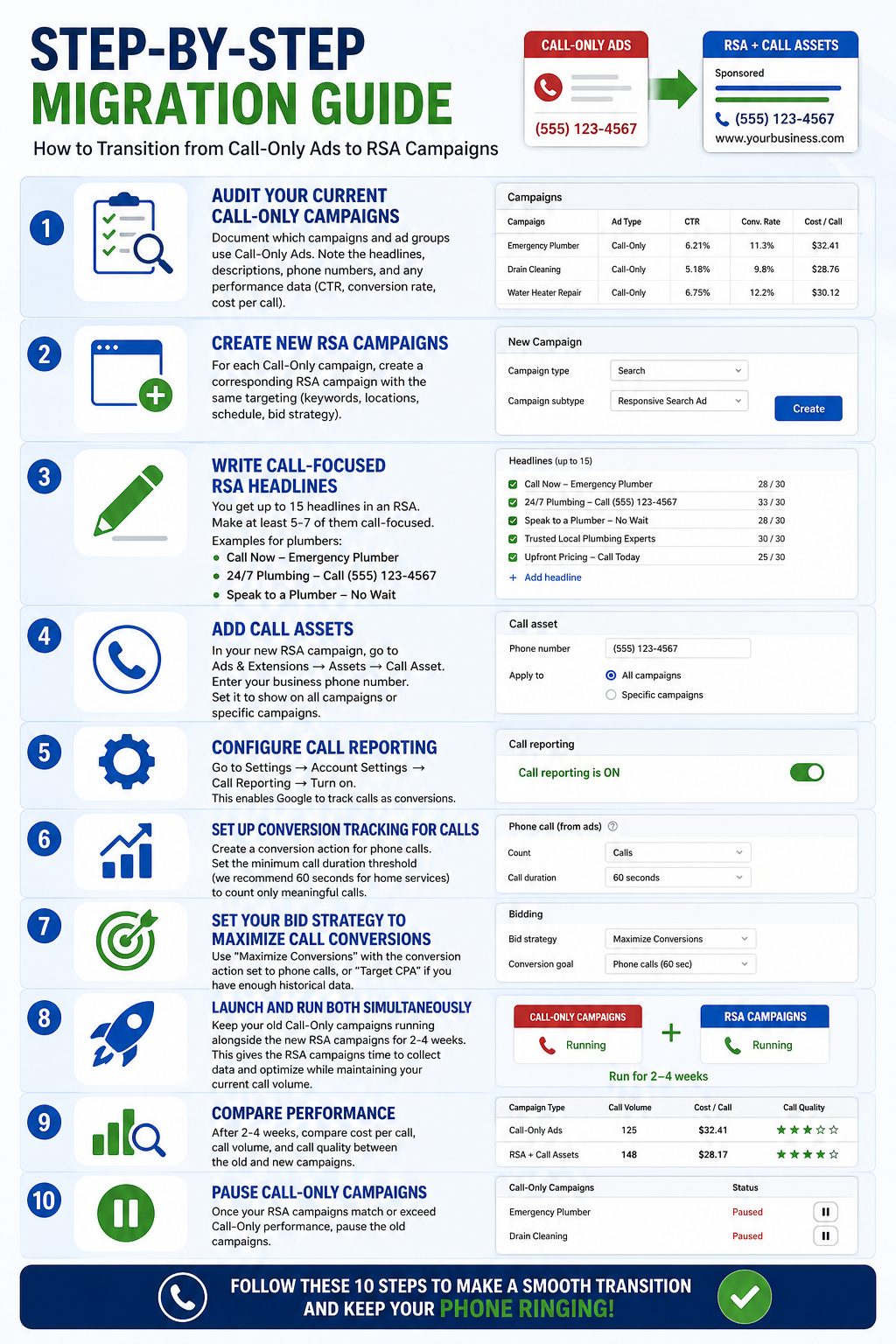
Step 1: Audit your current Call-Only campaigns. Document which campaigns and ad groups use Call-Only Ads. Note the headlines, descriptions, phone numbers, and any performance data (CTR, conversion rate, cost per call).
Step 2: Create new RSA campaigns. For each Call-Only campaign, create a corresponding RSA campaign with the same targeting (keywords, locations, schedule, bid strategy).
Step 3: Write call-focused RSA headlines. You get up to 15 headlines in an RSA. Make at least 5-7 of them call-focused. Examples for plumbers: “Call Now-Emergency Plumber,” “24/7 Plumbing-Call [Phone Number],” “Speak to a Plumber-No Wait.”
Step 4: Add Call Assets. In your new RSA campaign, go to Ads & Extensions → Assets → Call Asset. Enter your business phone number. Set it to show on all campaigns or specific campaigns.
Step 5: Configure call reporting. Go to Settings → Account Settings → Call Reporting → Turn on. This enables Google to track calls as conversions.
Step 6: Set up conversion tracking for calls. Create a conversion action for phone calls. Set the minimum call duration threshold (we recommend 60 seconds for home services) to count only meaningful calls.
Step 7: Set your bid strategy to maximize call conversions. Use “Maximize Conversions” with the conversion action set to phone calls, or “Target CPA” if you have enough historical data.
Step 8: Launch and run both simultaneously. Keep your old Call-Only campaigns running alongside the new RSA campaigns for 2-4 weeks. This gives the RSA campaigns time to collect data and optimize while maintaining your current call volume.
Step 9: Compare performance. After 2-4 weeks, compare cost per call, call volume, and call quality between the old and new campaigns.
Step 10: Pause Call-Only campaigns. Once your RSA campaigns match or exceed Call-Only performance, pause the old campaigns.
Call Assets vs Call Extensions
Google rebranded “Call Extensions” as “Call Assets” in 2022, but many advertisers still use the old terminology. They’re the same thing.
Call Assets display your phone number alongside your RSA. On mobile, the phone number is tappable and initiates a call. On desktop, the number is displayed for the user to dial.
Account-level Call Assets apply to all campaigns. Use this if your business has one phone number for all services.
Campaign-level Call Assets apply to specific campaigns. Use this if you have different numbers for different services (e.g., a separate emergency line).
Ad group-level Call Assets apply to specific ad groups. Use this for the most granular control.
For most plumbers and electricians, an account-level Call Asset with your main business number is sufficient.
Need More Calls for Your Business?
Google Ads Experts • High-Intent Leads • Fast Setup
Bid Strategy Changes
Call-Only Ads used simple bidding because the only action was a phone call. With RSAs, you need to be more intentional about your bid strategy to ensure you’re optimizing for calls rather than clicks.
Recommended bid strategy: Maximize Conversions with the conversion action set to phone calls (minimum 60-second duration). This tells Google’s algorithm to prioritize showing your ads to people most likely to call.
Alternative: Target CPA if you have at least 30 call conversions in the past 30 days. Set your target CPA to your desired cost per call.
What to avoid: Don’t use “Maximize Clicks”-this optimizes for website visits, not calls. For a business that depends on phone calls, optimizing for clicks will waste budget on visitors who browse your site without calling.
Performance Comparison: Old Call-Only vs New RSA+Call
Early data from advertisers who have already migrated shows mixed but generally positive results:
Call volume: Most advertisers see comparable or slightly higher call volume from RSAs with Call Assets, because the RSA format can appear in more ad placements.
Cost per call: Initially, cost per call may be 10-15% higher as the algorithm optimizes the new campaigns. After 4-6 weeks of learning, most advertisers report cost per call that matches or beats their old Call-Only campaigns.
Call quality: Call quality tends to improve because RSAs also show your website URL, which filters out some of the tire-kickers. People who call after seeing more information about your business tend to be more qualified.
Click-through rate: RSAs typically see higher CTR than Call-Only Ads because Google can test multiple headline and description combinations and serve the best-performing version for each search.
Impact on Home Service Businesses
Plumbers, electricians, HVAC companies, and other home service businesses that rely heavily on phone calls will feel this change the most. Here’s how it specifically affects you:
Emergency service calls will continue to work well. People searching “emergency plumber near me” on their phone will still see a prominent call button in your RSA.
After-hours calls may actually improve. RSAs can be configured with ad scheduling and call scheduling independently. You can show ads 24/7 but direct after-hours calls to a specific number or answering service.
Call tracking gets better. RSA call reporting provides more detailed data on which specific headlines and descriptions drive the most calls.
The learning curve is temporary. If you set up your RSA campaigns correctly from the start, the transition should be smooth. The biggest risk is waiting too long and being forced into a rushed migration.
Timeline: Key Dates to Know
- February 2026: No new Call-Only Ad campaigns can be created
- 2026 (ongoing): Existing Call-Only Ads continue to run but with potentially reduced auction priority
- February 2027: All Call-Only Ads stop serving permanently
- Recommended migration deadline: Complete by Q3 2026 at the latest to allow optimization time
Action Checklist for Plumbers and Electricians
Use this checklist to ensure a smooth transition:
- ☐ Audit all existing Call-Only Ad campaigns
- ☐ Document current performance metrics (cost per call, call volume, CTR)
- ☐ Create new RSA campaigns with call-focused headlines
- ☐ Add Call Assets to all RSA campaigns
- ☐ Enable call reporting in account settings
- ☐ Set up phone call conversion tracking (60+ second threshold)
- ☐ Configure bid strategy for call conversions
- ☐ Run old and new campaigns simultaneously for 2-4 weeks
- ☐ Compare performance and adjust RSA campaigns
- ☐ Pause Call-Only campaigns once RSAs perform at parity or better
- ☐ Monitor call quality and cost per call weekly for the first month
How to Maintain Call Volume During Transition
The biggest fear for home service businesses is losing phone calls during the migration. Here’s how to prevent that:
Don’t kill Call-Only Ads before RSAs are proven. Run both simultaneously during the transition period. Yes, your total ad spend will be temporarily higher. That’s the cost of a safe migration.
Start with your highest-volume campaigns. Migrate your most important campaigns first (emergency services) so they have the most time to optimize.
Increase RSA budgets gradually. As RSA call volume grows, proportionally decrease Call-Only budgets. This creates a smooth handoff rather than a sudden switch.
Monitor daily during the first two weeks. Check call volume, cost per call, and call quality every day during the initial transition. If you see a significant drop in calls, diagnose the issue immediately-it’s usually a bid strategy or conversion tracking problem.
Have a fallback. If RSA performance is significantly worse after four weeks, you can continue running Call-Only campaigns until closer to the deadline. But in most cases, proper setup resolves any initial performance gaps within 2-3 weeks.
The retirement of Call-Only Ads is a change, not a crisis. With proper planning and setup, your plumbing or electrical business can maintain-and likely improve-call volume through the new RSA format. The key is starting the migration now rather than waiting until the deadline forces your hand.
