

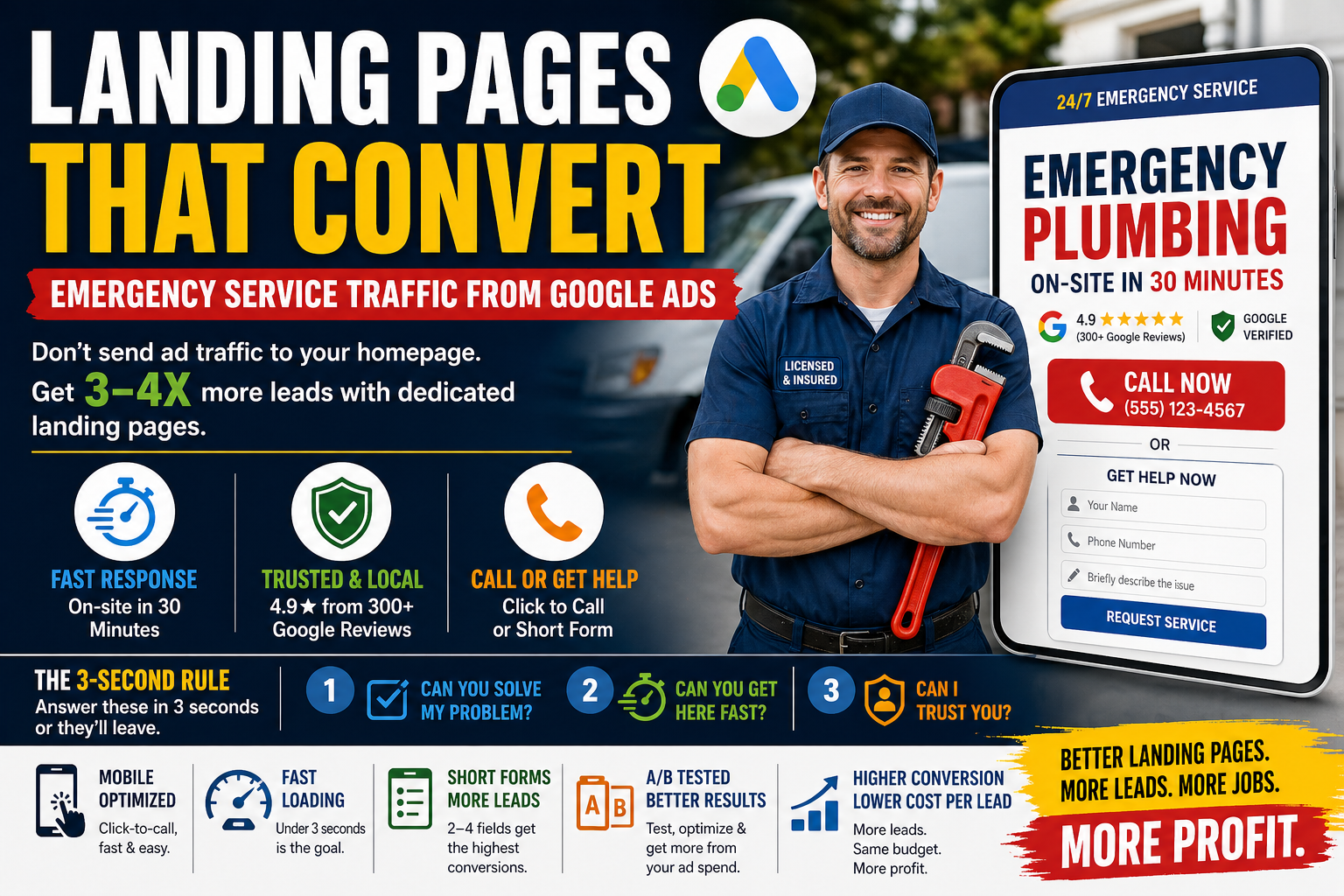
You can run the most perfectly optimized Google Ads campaign in the world - the right keywords, the right bids, compelling ad copy - and still lose money if your landing page doesn’t convert.
Here’s the harsh truth most home service businesses don’t want to hear: sending Google Ads traffic to your homepage is one of the most expensive mistakes you can make. Homepages convert at 2-4% for home service businesses. A dedicated, optimized landing page converts at 8-15%. That’s a 3-4x difference in conversion rate, which means 3-4x more leads for the same ad spend.
For emergency service businesses - plumbers, electricians, HVAC companies, locksmiths - the landing page is even more critical. Your potential customer is stressed, in a hurry, and making a decision in seconds. If your page doesn’t immediately answer three questions - “Can you help me? Can you get here fast? Can I trust you?” - they’ll hit the back button and call your competitor.
This guide covers everything you need to know about building landing pages that convert emergency service traffic from Google Ads.
Why Landing Pages Beat Homepages
Your homepage serves multiple audiences: existing customers, job seekers, vendors, partners, curious browsers. It has navigation menus, blog links, about pages, and service overviews. It’s designed to be a hub, not a conversion machine.
A landing page has one job: convert the visitor into a lead. No navigation distractions. No blog links. No “About Us” sidebar. Every element on the page exists to drive the visitor toward one action - calling you or filling out a form.
The data is clear: Dedicated landing pages for Google Ads consistently outperform homepages by 2-4x in conversion rate across the home service industry. For a plumber spending $3,000/month on ads:
- Homepage (3% conversion rate): 90 clicks × 3% = 2.7 leads per 90 clicks → about 75 leads/month
- Landing page (10% conversion rate): 90 clicks × 10% = 9 leads per 90 clicks → about 250 leads/month
Same ad spend. Same number of clicks. More than 3x the leads. The landing page doesn’t generate more traffic - it converts more of the traffic you’re already paying for.
The 3-Second Rule for Emergency Service Pages
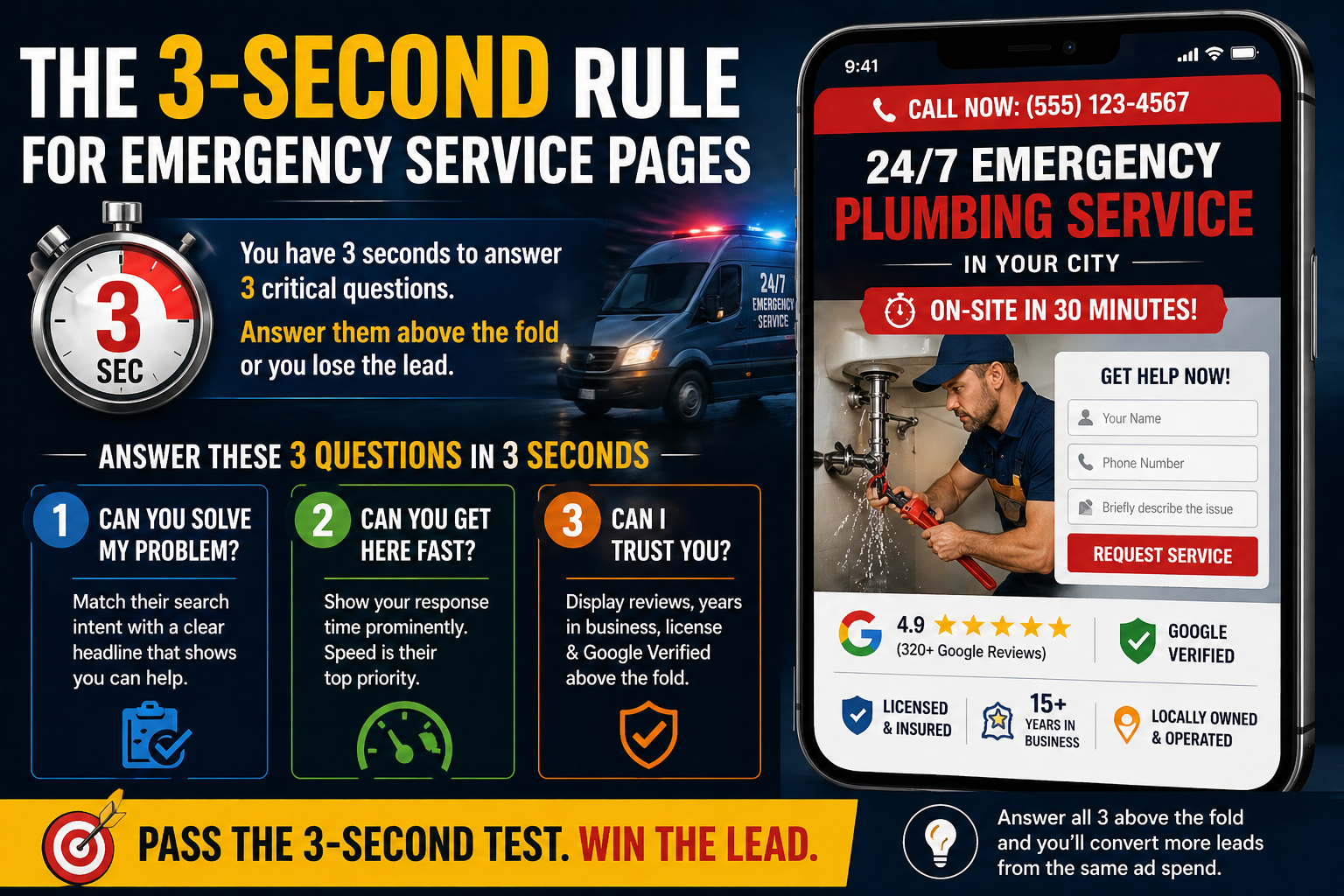
When someone is locked out, has a burst pipe, or is sitting in a dark house with no electricity, they decide whether to stay on your page or leave within 3 seconds. Your landing page needs to answer three questions in that time:
1. “Can you solve my problem?” The headline must match their search intent. If they searched “emergency plumber near me,” the headline should say “Emergency Plumber” - not “Welcome to ABC Plumbing Solutions.” Match the ad copy to the landing page headline for maximum relevance.
2. “Can you get here fast?” Display your response time prominently: “On-Site in 30 Minutes” or “Same-Day Service Guaranteed.” Emergency customers prioritize speed above almost everything else.
3. “Can I trust you?” Show your Google review rating, years in business, license number, and the Google Verified badge if you have it. These trust signals need to be visible without scrolling.
If your landing page answers all three questions above the fold - meaning before the visitor scrolls - you’ve passed the 3-second test.
Above-the-Fold Elements
The above-the-fold area (what’s visible without scrolling) is the most important real estate on your landing page. Here’s exactly what should be there:
Headline that matches the ad and search intent. If your ad says “24/7 Emergency Plumber - [City],” the landing page headline should say “24/7 Emergency Plumbing Service in [City].” Keyword and message matching between ad and landing page improves both conversion rate and Quality Score.
Phone number - large and clickable. For emergency services, the phone number should be the most prominent element on the page. Make it large (20px+ font size), use a contrasting color, and ensure it’s click-to-call on mobile. Many landing page experts recommend placing the phone number in the top right corner of the page and repeating it in the hero section.
Short form as an alternative. Not everyone wants to call. Include a 3-4 field form (name, phone, brief description of issue) for people who prefer to submit their information. Keep it short - every additional field reduces form completion rates by 10-15%.
Primary trust signal. Your Google review rating with the number of reviews (e.g., “4.9★ from 312 reviews”) or your Google Verified badge. Pick your strongest trust signal and make it visible.
Response time promise. “On-site in 30 minutes” or “Same-day service” - whatever your actual response time is. Be honest. A promise you can’t keep will backfire in reviews.
One clear CTA. “Call Now for Emergency Service” or “Get Help in 30 Minutes.” Don’t give the visitor 5 options. Give them one clear action to take.
Trust Signals That Actually Convert
Not all trust signals are equal. Here are the ones that measurably improve conversion rates for home service landing pages:
Google review rating (most impactful). Display your star rating with the total review count. “4.8★ from 247 Google Reviews” is more convincing than “Highly Rated.” Link to your actual Google reviews so visitors can verify.
Google Verified / Google Guaranteed badge. If you run LSAs and have this badge, display it prominently. It’s Google’s own endorsement.
License and insurance information. Display your license number and “Licensed, Bonded & Insured” text. This is especially important for plumbers and electricians where licensing is required by law.
Years in business. “Serving [City] Since 2008” establishes longevity. New businesses can substitute other proof of credibility.
Real photos of your team. Photos of your actual technicians in uniform build more trust than any stock photo. Include your service vehicles too. A branded truck signals a real, established business.
Manufacturer certifications. If you’re certified by specific brands (Rinnai, Navien, Carrier, Trane), display those logos.
BBB rating. If you have a strong BBB rating (A or A+), display the badge.
What doesn’t work: Generic badges that aren’t real (“Best of [City] 2024” from sites you’ve never heard of), stock photos of models pretending to be plumbers, vague claims like “Best in the business” without evidence.
Mobile Optimization for Emergency Searches
Over 70% of emergency home service searches happen on mobile devices. If your landing page doesn’t work perfectly on phones, you’re losing the majority of your potential leads.
Click-to-call button. On mobile, the phone number must be a tappable button that initiates a call. Make it large enough to tap with a thumb (at least 44px × 44px) and use a contrasting color.
Sticky call button. Add a fixed “Call Now” button at the bottom of the screen that stays visible as the visitor scrolls. This ensures the call action is always accessible, no matter how far down the page they read.
No horizontal scrolling. Everything must fit within the mobile viewport. No images or tables that extend past the screen edge.
Thumb-friendly forms. Form fields should be large enough to tap and type into easily. Use appropriate input types (tel for phone, email for email) so the correct mobile keyboard appears.
Fast loading. Mobile networks can be slower than desktop connections. Optimize images, minimize JavaScript, and use lazy loading for below-the-fold content. Your page should load in under 3 seconds on a 4G connection.
Test on actual phones. Don’t just use Chrome’s mobile emulator. Load your page on an actual iPhone and Android phone and try to complete the conversion process yourself.
Page Speed Requirements
Google has confirmed that page speed directly affects both your Quality Score (which impacts CPC) and your conversion rate. For emergency services, speed is even more critical because impatient, stressed customers won’t wait.
Target: Under 3 seconds load time. Ideally under 2 seconds.
How to check: Use Google PageSpeed Insights (pagespeed.web.dev) and test your landing page. Aim for a score of 80+ on mobile.
Common speed killers for home service landing pages: - Unoptimized images (compress all images, use WebP format) - Too many fonts (stick to 1-2 font families) - Heavy JavaScript (remove unnecessary scripts, defer non-critical JS) - No caching (enable browser caching through your hosting) - Shared hosting (consider upgrading to a VPS or dedicated hosting if your site is slow)
The business impact: Studies consistently show that each additional second of load time reduces conversion rates by 7-10%. A page that loads in 5 seconds instead of 2 seconds could be losing 20-30% of potential conversions.
Form Design
For emergency home service landing pages, less is more when it comes to forms:
Minimum fields: Name, phone number. That’s it for emergency requests. You can gather additional details when you call them back.
Optional fields: Email (useful for follow-up), brief description of the issue (helps your dispatcher prepare).
Maximum fields: Never exceed 5 fields on a home service landing page. Each additional field reduces form completion rates.
Form placement: Above the fold, or immediately below the hero section. Don’t bury the form at the bottom of the page.
Submit button text: “Get Help Now” or “Request Emergency Service” converts better than generic “Submit.” The button text should reinforce the urgency and value.
Thank-you page: After form submission, redirect to a thank-you page that confirms receipt, provides an estimated callback time, and displays your phone number in case they want to call directly.
Click-to-Call Button Optimization
For emergency services, the phone call is your primary conversion. Optimize every aspect of the call experience:
Button design: Use a contrasting color (orange or green work well against blue/navy themes), make it large, and include action-oriented text like “Call Now - Free Estimate” or “Tap to Call - 24/7 Service.”
Placement: At least three locations - header, hero section, and floating/sticky at the bottom on mobile.
Phone number format: Display the number in a readable format: (555) 123-4567. Not 5551234567.
Call tracking number: If you use call tracking, make sure the tracking number displays correctly on both desktop and mobile. Test that calls route properly to your business.
After-hours routing: If the visitor calls outside business hours, make sure the call goes to a voicemail or answering service with a professional greeting. A dead line or infinite ringing kills trust.
Service-Specific vs General Landing Pages
Should you create one landing page or multiple pages for different services?
The answer: Multiple pages perform better. A landing page for “emergency drain cleaning” converts higher than a general “plumbing services” page when the visitor searched specifically for drain cleaning. The message matches their intent more precisely.
Minimum recommended pages for plumbers: - Emergency plumbing (burst pipes, leaks, backups) - Drain cleaning - Water heater repair/installation - General plumbing (faucets, toilets, fixtures)
Each page should have: - A headline matching that specific service - Service-specific trust signals and photos - Pricing starting points for that service type - FAQs relevant to that service - The same phone number and form design across all pages
A/B Testing Ideas for Plumber/Electrician Pages
Once your base landing page is live, continuous A/B testing helps you squeeze more conversions from the same traffic:
Headline tests: “Emergency Plumber - On-Site in 30 Minutes” vs “24/7 Emergency Plumbing - [City]” vs “[City]’s #1 Rated Emergency Plumber”
CTA button tests: “Call Now” vs “Get Help Now” vs “Schedule Emergency Service” and different colors (orange vs green vs red)
Form length tests: 2 fields (name + phone) vs 4 fields (name + phone + email + issue) - shorter forms usually win for emergency services
Trust signal tests: Google reviews badge vs BBB badge vs license number prominently displayed
Photo tests: Team photo vs service vehicle vs before/after work photos
Pricing tests: Showing starting prices (“From $89”) vs not showing prices vs “Call for Free Estimate”
Run one test at a time to isolate the impact. Give each test at least 100 conversions (across both variants combined) before drawing conclusions.
Photos That Build Trust
The photos on your landing page matter more than most home service businesses realize:
Use real photos of your actual team. Uniformed technicians standing next to branded vehicles. Team photos in front of your shop. Individual headshots of your lead plumbers. These are 10x more effective than stock photos.
Show your work. Before-and-after photos of completed jobs. A new water heater installation. A repaired sewer line. Visual evidence of quality work builds confidence.
Avoid stock photos of models. Consumers can spot stock photos instantly, and they create distrust. A stock photo of a smiling person in a hard hat holding a wrench tells the visitor nothing about your actual business.
Photo quality matters, but authenticity matters more. A slightly imperfect iPhone photo of your real team is more persuasive than a professionally shot stock image. That said, basic quality standards apply - photos should be well-lit, in focus, and relevant.
Common Landing Page Mistakes
Mistake 1: Using your homepage. Already covered above - it’s the most expensive mistake.
Mistake 2: No phone number above the fold. For emergency services, if the visitor has to scroll to find your phone number, you’ve already lost them.
Mistake 3: Slow load time. Every second over 3 seconds costs you conversions.
Mistake 4: Navigation menus. Landing pages should NOT have your full website navigation. Every link is an exit opportunity. Remove the nav bar and keep the visitor focused on converting.
Mistake 5: Too much text. Emergency customers aren’t reading paragraphs. They’re scanning for answers to “can you help me,” “how fast,” and “can I trust you.” Use short paragraphs, bullet points, and visual hierarchy.
Mistake 6: No mobile optimization. Over 70% of your traffic is mobile. If you’re not testing on actual phones, you’re guessing.
Mistake 7: Generic messaging. “Quality plumbing services” means nothing. “Emergency plumber on-site in 30 minutes - licensed, insured, 4.9★ rated” means everything.
Tools for Building Landing Pages
Unbounce: Professional landing page builder with A/B testing built in. Best for businesses spending $3,000+/month on ads. Pricing starts around $99/month.
Elementor (WordPress): If your site runs on WordPress, Elementor lets you build dedicated landing pages within your existing site. Free version available; Pro starts at $59/year.
Leadpages: Simpler than Unbounce, good for beginners. Templates available for home services. Starts at $49/month.
Instapage: Enterprise-grade with advanced personalization features. Best for agencies or larger operations. Starting around $199/month.
For most single-location home service businesses, Elementor is the most practical choice - you can build landing pages within your existing WordPress site without additional monthly costs.
Measuring Landing Page Performance
Track these metrics to understand how your landing page is performing:
Conversion rate. The percentage of visitors who call or submit a form. Target: 8-15% for emergency services.
Bounce rate. The percentage of visitors who leave without taking any action. Target: under 50%. Above 60% indicates a problem.
Average time on page. How long visitors spend on your page. For emergency services, shorter is actually better - 30-60 seconds means they found what they needed and called.
Page load time. Under 3 seconds. Check with Google PageSpeed Insights.
Click-to-call rate (mobile). What percentage of mobile visitors tap the call button. Track this with Google Tag Manager events.
Form completion rate. Of visitors who start filling out the form, what percentage submit it. If many start but don’t finish, your form may have too many fields or a confusing layout.
Review these metrics monthly and use them to guide your A/B testing priorities. Focus on the metric with the most room for improvement first.
