

Here’s a number that should make every plumber running Google Ads uncomfortable: the average Google Ads account wastes 15-30% of its budget on irrelevant clicks. For a plumber spending $3,000/month, that’s $450-$900 per month flushed down the drain on clicks from people who will never hire you.
The fix is negative keywords — the list of search terms you tell Google NOT to show your ads for. A comprehensive negative keyword list is the single most impactful optimization you can make to a plumbing Google Ads account. It costs nothing to implement, takes an hour to set up, and immediately reduces wasted spend.
This guide gives you a complete, ready-to-use negative keyword list organized by category, plus the process for finding and adding new negatives over time.
What Are Negative Keywords and Why They Matter
When you add “plumber near me” as a keyword in Google Ads, Google shows your ad for that search — but also for related searches like “plumber jobs near me,” “plumber salary near me,” and “plumber training near me.” Those searchers aren’t customers. They’re job seekers, students, and curious browsers. But you still pay when they click.
Negative keywords prevent your ads from showing for specific search terms. Add “jobs” as a negative keyword, and your ad will never appear for “plumber jobs near me.” Add “salary” and you block “plumber salary.” Add “training” and you block “plumber training.”
Each negative keyword you add eliminates a category of wasted clicks. The cumulative effect is significant — a well-maintained negative keyword list can reduce wasted spend by 20-30% and lower your cost per lead by a similar margin.
How Much Money Negatives Save
Let’s quantify the impact with real numbers:
Before negative keywords: A plumber spends $3,000/month on Google Ads. Their average CPC is $12. They get 250 clicks. Of those, 60 (24%) are from irrelevant searches — job seekers, DIYers, people looking for supplies. That’s $720/month wasted, or $8,640/year.
After comprehensive negative keywords: The same $3,000 budget now generates 250 clicks from mostly relevant searches. With irrelevant clicks reduced by 80%, only about 12 irrelevant clicks slip through — saving roughly $576/month. Cost per lead drops from $50 to $38. Annual savings: $6,912.
The math is simple. Negative keywords don’t generate leads directly, but they ensure more of your budget goes toward clicks that can become leads.
Complete Negative Keyword List by Category
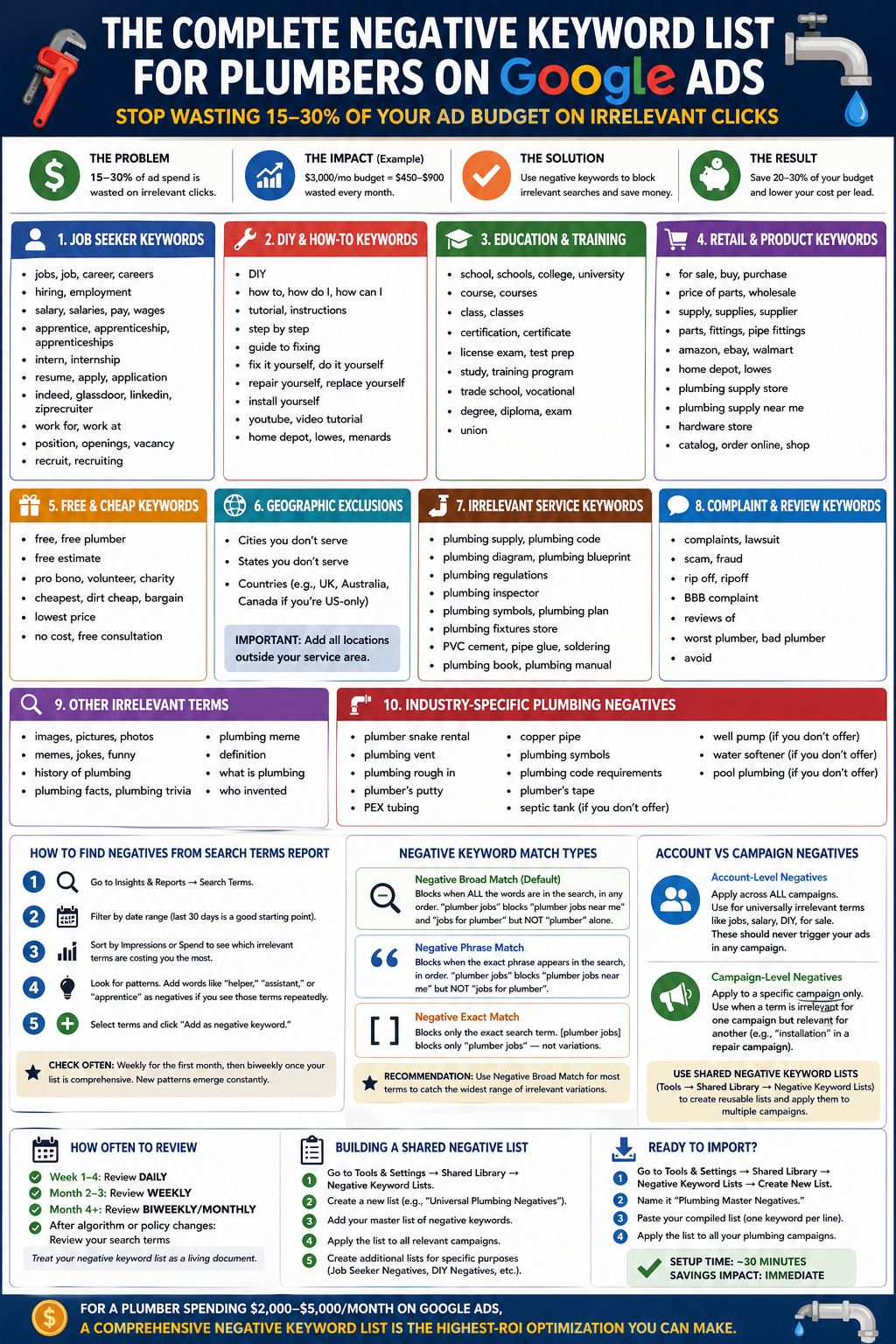
Here’s the full list, organized by category. Add all of these to your campaigns on day one.
Job Seeker Keywords
People looking for plumbing careers, not plumbing services.
- jobs
- job
- career
- careers
- hiring
- employment
- salary
- salaries
- pay
- wages
- apprentice
- apprenticeship
- apprenticeships
- intern
- internship
- resume
- apply
- application
- indeed
- glassdoor
- ziprecruiter
- work for
- work at
- position
- openings
- vacancy
- recruit
- recruiting
DIY and How-To Keywords
People trying to fix plumbing themselves.
- DIY
- how to
- how do I
- how can I
- tutorial
- instructions
- step by step
- guide to fixing
- fix it yourself
- do it yourself
- repair yourself
- replace yourself
- install yourself
- youtube
- video tutorial
- home depot
- lowes
- menards
Education and Training Keywords
Students and aspiring plumbers.
- school
- schools
- college
- university
- course
- courses
- class
- classes
- certification
- certificate
- license exam
- test prep
- study
- training program
- trade school
- vocational
- degree
- diploma
- exam
- union
Retail and Product Keywords
People shopping for parts and supplies, not services.
- for sale
- buy
- purchase
- price of parts
- wholesale
- supply
- supplies
- supplier
- parts
- fittings
- pipe fittings
- amazon
- ebay
- walmart
- home depot
- lowes
- plumbing supply store
- plumbing supply near me
- hardware store
- catalog
- order online
- shop
Free and Cheap Keywords
Searches that signal very low willingness to pay.
- free
- free plumber
- free estimate (consider keeping — some plumbers offer free estimates)
- pro bono
- volunteer
- charity
- cheapest
- dirt cheap
- bargain
- lowest price
- no cost
- free consultation
Geographic Exclusion Keywords
Block city names outside your service area. This will be unique to your business, but common examples include:
- [Cities you don’t serve]
- [States you don’t serve]
- [Countries — block “UK,” “Australia,” “Canada” if you’re US-only]
Irrelevant Service Keywords
Services that share plumbing terminology but aren’t what you offer.
- plumbing supply
- plumbing code
- plumbing diagram
- plumbing blueprint
- plumbing regulations
- plumbing inspector
- plumbing inspection (keep if you offer this)
- plumbing symbols
- plumbing plan
- plumbing fixtures store
- PVC cement
- pipe glue
- soldering
- plumbing book
- plumbing manual
Complaint and Review Keywords
People researching complaints, not hiring.
- complaints
- lawsuit
- scam
- fraud
- rip off
- ripoff
- BBB complaint
- reviews of (consider keeping — some may be researching you)
- worst plumber
- bad plumber
- avoid
Other Irrelevant Terms
- images
- pictures
- photos
- memes
- jokes
- funny
- history of plumbing
- plumbing facts
- plumbing trivia
- plumbing meme
- definition
- what is plumbing
- who invented
How to Find Negatives from Your Search Terms Report
Your initial negative keyword list catches the obvious waste. But new irrelevant searches appear constantly. Here’s how to find them:
Step 1: In Google Ads, go to Insights and Reports → Search Terms.
Step 2: Filter by date range (last 30 days is a good starting point).
Step 3: Sort by impressions or spend to see which irrelevant terms are costing you the most.
Step 4: Look for patterns. If you see “plumber helper jobs” and “plumber assistant jobs” and “plumber apprentice jobs,” add “helper,” “assistant,” and “apprentice” as negatives (if not already on your list).
Step 5: Add identified terms as negative keywords directly from the search terms report by selecting them and clicking “Add as negative keyword.”
How often to check: Weekly for the first month, then biweekly once your list is comprehensive. New search patterns emerge constantly — especially around trending topics, seasonal shifts, and news events.
Match Types for Negative Keywords
Negative keywords support the same match types as regular keywords, but they work slightly differently:
Negative broad match (default): Blocks your ad when ALL the words in the negative are present in the search, in any order. Adding “plumber jobs” as negative broad match blocks “plumber jobs near me” and “jobs for plumber” but does NOT block “plumber” alone.
Negative phrase match: Blocks your ad when the exact phrase appears in the search, in order. Adding “plumber jobs” as negative phrase match blocks “plumber jobs near me” but does NOT block “jobs for plumber” (different word order).
Negative exact match: Blocks only the exact search term. Adding [plumber jobs] as negative exact match blocks only the search “plumber jobs” — not “plumber jobs near me” or “plumber jobs in miami.”
Recommendation: Use negative broad match for most terms. It catches the widest range of irrelevant variations. Use negative phrase or exact match only when you need precision — for example, blocking “free estimate” (exact) while keeping “free emergency consultation” (which might be a service you offer).
Account-Level vs Campaign-Level Negatives
Google Ads allows you to apply negatives at different levels:
Account-level negative keywords apply across all campaigns. Use this for universally irrelevant terms like “jobs,” “salary,” “DIY,” and “for sale.” These should never trigger your ads regardless of campaign.
Campaign-level negative keywords apply to a specific campaign only. Use this when a term is irrelevant for one campaign but relevant for another. For example, “installation” might be a negative in your repair campaign but a target keyword in your installation campaign.
Shared negative keyword lists (found under Tools → Shared Library → Negative Keyword Lists) let you create reusable lists that apply to multiple campaigns. Create a master list of universal negatives and apply it to all campaigns. Create service-specific lists for additional granularity.
How Often to Review and Update
Your negative keyword list is never finished. Treat it as a living document:
Week 1-4 (new campaigns): Review search terms daily. New campaigns attract the most irrelevant traffic because Google is still learning what your ads are about.
Month 2-3: Review weekly. You’ll still find new irrelevant terms, but the volume decreases.
Month 4+: Review biweekly or monthly. By now, your list should catch most irrelevant searches. You’re mainly looking for new patterns and seasonal terms.
After algorithm or policy changes: Whenever Google changes how it interprets match types (which happens occasionally), review your search terms for any new irrelevant traffic that started slipping through.
Building a Shared Negative Keyword List
If you manage multiple campaigns or multiple plumbing client accounts, shared negative keyword lists save time:
Step 1: In Google Ads, go to Tools and Settings → Shared Library → Negative Keyword Lists.
Step 2: Create a new list (e.g., “Universal Plumbing Negatives”).
Step 3: Add your master list of negative keywords.
Step 4: Apply the list to all relevant campaigns.
Step 5: Create additional lists for specific purposes: “Job Seeker Negatives,” “DIY Negatives,” “Retail Negatives.” This modularity makes it easy to update individual categories without touching the entire list.
Industry-Specific Negatives for Plumbing
Beyond the general negatives listed above, plumbing has some unique terms to block:
- plumber snake rental (they want to rent a tool, not hire you)
- plumbing vent (often an informational search, not a service request)
- plumbing rough in (construction/builder term, not homeowner)
- plumber’s putty (product search)
- PEX tubing (product search)
- copper pipe (product search unless you specify “repair”)
- plumbing symbols (informational/educational)
- plumbing code requirements (informational)
- plumber’s tape (product search)
- septic tank (block if you don’t offer septic services)
- well pump (block if you don’t service well pumps)
- water softener (block if you don’t install/repair these)
- pool plumbing (block if you don’t do pool work)
Download: Ready-to-Import Negative Keyword List
You can copy the entire list above and import it directly into Google Ads:
Step 1: Go to Tools and Settings → Shared Library → Negative Keyword Lists → Create New List.
Step 2: Name it “Plumbing Master Negatives.”
Step 3: Paste your compiled list (one keyword per line).
Step 4: Apply the list to all your plumbing campaigns.
The entire setup takes about 30 minutes, and it will start saving you money immediately. For a plumber spending $2,000-$5,000/month on Google Ads, a comprehensive negative keyword list is the highest-ROI optimization you can make.
